
Not every Pixel user loves the At a Glance widget. At a Glance shows users relevant information on their Pixel’s lock screens and home screens. Personally, I love it, but there are some who would prefer that Google give them the opportunity to make At a Glance disappear from their home screens. Well, it turns out that Google is working on a way to make this happen. Spotted by Android Authority, the latest Android Canary build with Android System Intelligence version B.17.playstore.pixel10.825046611 includes a toggle that will apparently be added to the At a Glance widget’s settings.
A toggle was discovered that allows a Pixel user to remove At a Glance from his home screen
The controls read, “Show on home screen” and toggling this setting off would presumably remove At a Glance from Pixel home screens. While Android Authority was able to take a screenshot showing the toggleit isn’t clear when it will be available for Pixel users. If you’re not familiar with the widget, it will alert you to severe weather and earthquakes on one hand, but will also tell you the status of your phone’s flashlight while doubling as a shortcut to turn it on or off.
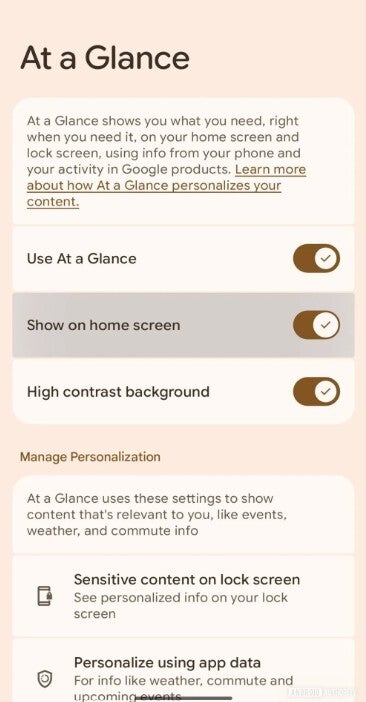

Pixel users will soon be able to remove the At a Glance widget from their home screen. | Image credit-Android Authority
For a good idea about how much information you can get from the At a Glance widget, find an empty spot on your home screen and long-press on it. That will result in a popup hitting the screen with three options: Dismiss, Settings, and About this content. Tap on Settings and you’ll see options to manage content relevant to the user such as info about the weather, commuting, and events.
The widget delivers useful information to Pixel users
Toggle buttons allow you to enable or disable custom info on the widget such as:
WeatherAir qualitySevere weather alertsEarthquake alertsUpcoming eventsWork profileFood and household ordersPackage deliveryCommute traffic and travel timeTime to leave to make an upcoming appointment in timeRidesharingTravel on planes, trains and other travel informationBedtimeFitnessSafety checkTimer & stopwatchConnected devices connection and battery statusCross device time info from your home devicesDoorbell shows images from Nest or Ring doorbell cameraFlashlight
You can see from that list how inclusive the At a Glance widget is and why someone who loves information would want it enabled on his/her Pixel. As for those who just don’t like it, the current way to disable At a Glance involves a long-press on the home screen, tapping on settings, and toggling off Use At a Glance, the very first toggle screen at the top of the settings page. But that won’t completely turnoff the widget as it will still show the time and date on the home screen.

Iconic Phones is now up for pre-order in the US!
Our new coffee table book, Iconic Phones, is a stunning visual tribute to the legends in the world of phones, featuring exclusive high-resolution photography, stories, quotes and fun trivia. Pre-order now and save 15% with code: PARENA15
Pre-order now
Read the latest from Alan Friedman




GIPHY App Key not set. Please check settings