
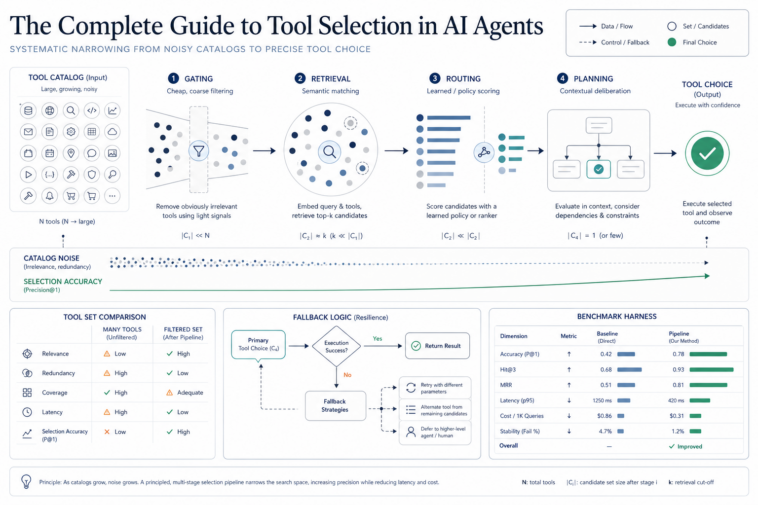
In this article, you will learn why agent accuracy degrades as a tool catalog grows, and six practical techniques for keeping tool selection accurate and efficient at scale.
Topics we will cover include:

Why adding more tools to an agent causes tool hallucination and accuracy loss, not just slower responses.
How gating, retrieval, routing, and planning each narrow down what the model sees before it has to choose a tool.
How to build fallback logic and a benchmark harness so you can measure whether any of these fixes actually worked.
None of this requires a bigger model, just a smarter view of what the model sees before it acts.
Introduction
You build an agent with five tools. It works flawlessly in the demo. Three months later, it has 40 file operations, CRM access, Slack, a calendar, and three different search APIs you bolted on for different teams. The same agent that nailed every demo now calls the wrong tool, hallucinates parameters borrowed from a different tool’s schema, or stalls mid-task waiting on a call that should never have been made.
Nothing about the model changed. The tool list did. This is not an edge case you’ll eventually run into. It’s the default trajectory of every agent that ships and then grows. Research analyzing MCP tool descriptions across the ecosystem has found that a high number contain at least one quality issue, and production benchmarks show agent accuracy degrading measurably once tool counts pass roughly 10 to 15. The RAG-MCP paper, published in May 2025, put hard numbers on the fix: retrieval-based tool selection more than tripled tool selection accuracy from 13.62% to 43.13% while cutting prompt tokens by over half on the same benchmark tasks.
Tool selection isn’t a minor implementation detail you patch later. It’s the architectural decision that determines whether an agent survives contact with a real tool catalog. This guide covers six techniques that solve it, in the order you’d actually deploy them: gating, retrieval, routing, planning, fallback logic, and the benchmark that tells you whether any of it worked.
Why Tool Selection Breaks at Scale
Every tool definition — its name, description, and parameter schema — gets sent to the model on every single request, whether that tool gets used or not. With 50-plus tools, this can consume 5 to 7% of the model’s context before the user’s actual message arrives, crowding out the conversation history and reasoning space the task actually needs.
The “lost in the middle” effect compounds this. Models recall information at the start and end of a context window far more reliably than information buried in the middle. With dozens of near-identical tool definitions stacked in sequence, the one tool that’s actually right for the job often sits exactly in that dead zone, overlooked not because the model can’t reason about it, but because attention is structurally pulled elsewhere.
The second failure mode is worse: tool hallucination. When an LLM’s attention spreads across too many similar-sounding tools, it either invents tool names that don’t exist or calls the correct tool while filling in arguments borrowed from a different tool’s schema. This is a hard failure. There’s no “slightly wrong” way to call a nonexistent function.
OpenAI documents a hard ceiling of 128 tools per agent, but real degradation shows up well before that limit; most production teams see accuracy drop noticeably once they cross 15 to 20 tools in active rotation. The fix isn’t a bigger context window. It’s controlling what the model sees in the first place.
Gating: Deciding Whether a Tool Is Needed at All
Before you optimize which tool to pick, ask a cheaper question first: does this turn need a tool at all? A meaningful fraction of agent turns are purely conversational: “thanks,” “what do you mean by that,” a follow-up clarification. Running full retrieval and tool-selection reasoning on every single turn means paying the full agentic overhead even when the answer is “no tool needed.”
A gate is a fast, cheap classifier — sometimes a small model call, sometimes just pattern matching — that runs before anything expensive does.
# gate.py
# Prerequisites: none beyond Python’s standard library (re)
# Run: python gate.py
import re
CONVERSATIONAL_PATTERNS = (
r”^\s*(thanks|thank you|thx|ok|okay|cool|got it|sounds good|sure|great)\b”,
r”^\s*(hi|hello|hey|good morning|good evening)\b”,
r”^\s*what do you mean\b”,
r”^\s*can you (clarify|explain that)\b”,
)
ACTION_KEYWORDS = (
“send”, “create”, “search”, “find”, “look up”, “schedule”, “book”,
“read”, “write”, “query”, “summarize”, “translate”, “check”,
)
def gate(query: str) -> dict:
“””
Cheap pre-filter that decides whether the full tool-selection pipeline
needs to run at all. Short-circuits conversational turns before
retrieval, routing, or planning ever fires.
“””
q_lower = query.strip().lower()
# Tier 1: regex match against known conversational patterns — near-zero cost
for pattern in CONVERSATIONAL_PATTERNS:
if re.match(pattern, q_lower):
return {“tool_needed”: False, “reason”: “conversational_pattern”, “tier”: 1}
# Tier 2: if there’s no action verb and the message is short, likely no tool needed
has_action_keyword = any(kw in q_lower for kw in ACTION_KEYWORDS)
if not has_action_keyword and len(q_lower.split()) < 5:
return {“tool_needed”: False, “reason”: “short_with_no_action_keyword”, “tier”: 2}
return {“tool_needed”: True, “reason”: “action_keyword_or_long_query”, “tier”: 2}
if __name__ == “__main__”:
test_queries = (
“thanks!”,
“What’s the weather like in Lagos today?”,
“ok”,
“Can you send an email to the sales team about the delay?”,
)
for q in test_queries:
result = gate(q)
print(f”‘{q}’ -> tool_needed={result(‘tool_needed’)} ({result(‘reason’)})”)
1
2
3
4
5
6
7
8
9
10
11
12
13
14
15
16
17
18
19
20
21
22
23
24
25
26
27
28
29
30
31
32
33
34
35
36
37
38
39
40
41
42
43
44
45
46
47
48
49
# gate.py
# Prerequisites: none beyond Python’s standard library (re)
# Run: python gate.py
import re
CONVERSATIONAL_PATTERNS = (
r”^\s*(thanks|thank you|thx|ok|okay|cool|got it|sounds good|sure|great)\b”,
r”^\s*(hi|hello|hey|good morning|good evening)\b”,
r”^\s*what do you mean\b”,
r”^\s*can you (clarify|explain that)\b”,
)
ACTION_KEYWORDS = (
“send”, “create”, “search”, “find”, “look up”, “schedule”, “book”,
“read”, “write”, “query”, “summarize”, “translate”, “check”,
)
def gate(query: str) -> dict:
“””
Cheap pre-filter that decides whether the full tool-selection pipeline
needs to run at all. Short-circuits conversational turns before
retrieval, routing, or planning ever fires.
“””
q_lower = query.strip().lower()
# Tier 1: regex match against known conversational patterns — near-zero cost
for pattern in CONVERSATIONAL_PATTERNS:
if re.match(pattern, q_lower):
return {“tool_needed”: False, “reason”: “conversational_pattern”, “tier”: 1}
# Tier 2: if there’s no action verb and the message is short, likely no tool needed
has_action_keyword = any(kw in q_lower for kw in ACTION_KEYWORDS)
if not has_action_keyword and len(q_lower.split()) < 5:
return {“tool_needed”: False, “reason”: “short_with_no_action_keyword”, “tier”: 2}
return {“tool_needed”: True, “reason”: “action_keyword_or_long_query”, “tier”: 2}
if __name__ == “__main__”:
test_queries = (
“thanks!”,
“What’s the weather like in Lagos today?”,
“ok”,
“Can you send an email to the sales team about the delay?”,
)
for q in test_queries:
result = gate(q)
print(f”‘{q}’ -> tool_needed={result(‘tool_needed’)} ({result(‘reason’)})”)
How to run (no dependencies required):
This costs almost nothing and catches a meaningful share of turns before they reach the expensive part of the pipeline. The threshold for “is this worth building” is low: if even 20–30% of your turns are conversational, gating pays for itself immediately in both latency and token cost.
Retrieval-Based Tool Selection
This is the technique with the strongest published evidence behind it. Instead of sending every tool definition on every call, you index tool descriptions in a vector store, embed the incoming query, retrieve only the top-K most relevant tools, and send just those to the model.
The RAG-MCP framework is the reference implementation of this idea, using semantic retrieval to identify the most relevant MCP tools for a query before the LLM ever sees the full catalog. The reported numbers are not subtle: tool selection accuracy rose from 13.62% with the full catalog exposed to 43.13% with retrieval-filtered selection, more than tripling accuracy, while cutting prompt tokens by over 50% on the same benchmark tasks.
# retriever.py
# Prerequisites: pip install sentence-transformers faiss-cpu numpy
# Run: python retriever.py
import numpy as np
from sentence_transformers import SentenceTransformer
import faiss
TOOL_CATALOG = (
{“name”: “search_web”, “description”: “Search the web for current information on any topic”},
{“name”: “read_file”, “description”: “Read the contents of a file given its path”},
{“name”: “write_file”, “description”: “Write or overwrite content to a file at a given path”},
{“name”: “send_email”, “description”: “Send an email to a recipient with subject and body”},
{“name”: “create_calendar_event”, “description”: “Create a new calendar event with a title, date, and time”},
{“name”: “query_database”, “description”: “Run a SQL query against the company database”},
{“name”: “list_github_issues”, “description”: “List open issues in a GitHub repository”},
{“name”: “create_github_pr”, “description”: “Create a pull request on a GitHub repository”},
{“name”: “send_slack_message”, “description”: “Send a message to a Slack channel or user”},
{“name”: “get_weather”, “description”: “Get current weather conditions for a city”},
{“name”: “translate_text”, “description”: “Translate text from one language to another”},
{“name”: “summarize_document”, “description”: “Summarize a long document into key points”},
{“name”: “lookup_stock_price”, “description”: “Get the current stock price for a ticker symbol”},
{“name”: “book_flight”, “description”: “Search and book a flight between two cities”},
{“name”: “create_invoice”, “description”: “Generate an invoice for a customer with line items”},
)
class ToolRetriever:
“””
Embeds tool descriptions once at startup and indexes them in FAISS.
At runtime, embeds the incoming query and returns only the top-K
most relevant tools — not the full catalog.
“””
def __init__(self, tools: list(dict), model_name: str = “all-MiniLM-L6-v2″):
self.tools = tools
self.model = SentenceTransformer(model_name)
descriptions = (f”{t(‘name’)}: {t(‘description’)}” for t in tools)
embeddings = self.model.encode(descriptions, normalize_embeddings=True)
# IndexFlatIP = inner product search, which equals cosine similarity
# when vectors are normalized — the standard setup for this use case.
self.index = faiss.IndexFlatIP(embeddings.shape(1))
self.index.add(np.array(embeddings, dtype=np.float32))
def retrieve(self, query: str, top_k: int = 3) -> list(dict):
query_emb = self.model.encode((query), normalize_embeddings=True)
scores, indices = self.index.search(np.array(query_emb, dtype=np.float32), top_k)
return (
{**self.tools(idx), “score”: float(score)}
for score, idx in zip(scores(0), indices(0))
)
if __name__ == “__main__”:
retriever = ToolRetriever(TOOL_CATALOG)
queries = (
“What’s the weather like in Lagos today?”,
“Can you check if there are any open bugs in our repo?”,
“Send a message to the engineering channel about the deploy”,
)
for q in queries:
results = retriever.retrieve(q, top_k=3)
print(f”\nQuery: ‘{q}'”)
for r in results:
print(f” {r(‘name’)} (score={r(‘score’):.3f})”)
1
2
3
4
5
6
7
8
9
10
11
12
13
14
15
16
17
18
19
20
21
22
23
24
25
26
27
28
29
30
31
32
33
34
35
36
37
38
39
40
41
42
43
44
45
46
47
48
49
50
51
52
53
54
55
56
57
58
59
60
61
62
63
64
# retriever.py
# Prerequisites: pip install sentence-transformers faiss-cpu numpy
# Run: python retriever.py
import numpy as np
from sentence_transformers import SentenceTransformer
import faiss
TOOL_CATALOG = (
{“name”: “search_web”, “description”: “Search the web for current information on any topic”},
{“name”: “read_file”, “description”: “Read the contents of a file given its path”},
{“name”: “write_file”, “description”: “Write or overwrite content to a file at a given path”},
{“name”: “send_email”, “description”: “Send an email to a recipient with subject and body”},
{“name”: “create_calendar_event”, “description”: “Create a new calendar event with a title, date, and time”},
{“name”: “query_database”, “description”: “Run a SQL query against the company database”},
{“name”: “list_github_issues”, “description”: “List open issues in a GitHub repository”},
{“name”: “create_github_pr”, “description”: “Create a pull request on a GitHub repository”},
{“name”: “send_slack_message”, “description”: “Send a message to a Slack channel or user”},
{“name”: “get_weather”, “description”: “Get current weather conditions for a city”},
{“name”: “translate_text”, “description”: “Translate text from one language to another”},
{“name”: “summarize_document”, “description”: “Summarize a long document into key points”},
{“name”: “lookup_stock_price”, “description”: “Get the current stock price for a ticker symbol”},
{“name”: “book_flight”, “description”: “Search and book a flight between two cities”},
{“name”: “create_invoice”, “description”: “Generate an invoice for a customer with line items”},
)
class ToolRetriever:
“””
Embeds tool descriptions once at startup and indexes them in FAISS.
At runtime, embeds the incoming query and returns only the top-K
most relevant tools — not the full catalog.
“””
def __init__(self, tools: list(dict), model_name: str = “all-MiniLM-L6-v2”):
self.tools = tools
self.model = SentenceTransformer(model_name)
descriptions = (f”{t(‘name’)}: {t(‘description’)}” for t in tools)
embeddings = self.model.encode(descriptions, normalize_embeddings=True)
# IndexFlatIP = inner product search, which equals cosine similarity
# when vectors are normalized — the standard setup for this use case.
self.index = faiss.IndexFlatIP(embeddings.shape(1))
self.index.add(np.array(embeddings, dtype=np.float32))
def retrieve(self, query: str, top_k: int = 3) -> list(dict):
query_emb = self.model.encode((query), normalize_embeddings=True)
scores, indices = self.index.search(np.array(query_emb, dtype=np.float32), top_k)
return (
{**self.tools(idx), “score”: float(score)}
for score, idx in zip(scores(0), indices(0))
)
if __name__ == “__main__”:
retriever = ToolRetriever(TOOL_CATALOG)
queries = (
“What’s the weather like in Lagos today?”,
“Can you check if there are any open bugs in our repo?”,
“Send a message to the engineering channel about the deploy”,
)
for q in queries:
results = retriever.retrieve(q, top_k=3)
print(f”\nQuery: ‘{q}'”)
for r in results:
print(f” {r(‘name’)} (score={r(‘score’):.3f})”)
How to run:
pip install sentence-transformers faiss-cpu numpy
python retriever.py
pip install sentence-transformers faiss-cpu numpy
python retriever.py
Only the top-3 tools out of a 15-tool catalog get sent to the model per query, an 80% reduction in tool definitions on every call, and the accuracy lift compounds because the model is now choosing between a handful of genuinely relevant candidates instead of scanning past a dozen near-misses.
Semantic Routing
Routing is retrieval’s lighter cousin, and it fits a different shape of problem. Retrieval answers “which specific tool” out of a flat list. Routing answers “which toolbox” — useful when your tools cluster naturally into categories (data, communication, scheduling) and you want to load only the relevant category’s tools rather than re-ranking the entire catalog every time.
# router.py
# Prerequisites: pip install scikit-learn numpy
# Run: python router.py
import numpy as np
from sklearn.feature_extraction.text import TfidfVectorizer
from sklearn.metrics.pairwise import cosine_similarity
CATEGORIES = {
“data”: (“query the database”, “read a file”, “write data to storage”, “run a SQL query”),
“communication”: (“send an email”, “post a slack message”, “notify the team”, “send a message”),
“scheduling”: (“create a calendar event”, “book a meeting”, “schedule an appointment”),
}
class SemanticRouter:
“””
Routes a query to a tool category using similarity against category
centroid embeddings. Falls back to ‘general’ when no category clears
the confidence threshold — never guesses on a low-confidence match.
“””
def __init__(self, categories: dict(str, list(str)), confidence_threshold: float = 0.15):
self.threshold = confidence_threshold
self.vectorizer = TfidfVectorizer()
all_examples = (ex for exs in categories.values() for ex in exs)
self.vectorizer.fit(all_examples)
# Build one centroid vector per category by averaging its example embeddings
self.centroids = {}
for cat, examples in categories.items():
vecs = self.vectorizer.transform(examples).toarray()
self.centroids(cat) = vecs.mean(axis=0)
def route(self, query: str) -> dict:
query_vec = self.vectorizer.transform((query)).toarray()(0)
scores = {
cat: float(cosine_similarity((query_vec), (centroid))(0)(0))
for cat, centroid in self.centroids.items()
}
best_cat = max(scores, key=scores.get)
best_score = scores(best_cat)
if best_score < self.threshold:
return {“category”: “general”, “confidence”: best_score}
return {“category”: best_cat, “confidence”: best_score}
if __name__ == “__main__”:
router = SemanticRouter(CATEGORIES)
test_queries = (
“Can you post a message in the sales Slack channel?”,
“I need to run a query against our production database”,
“Schedule a meeting with the design team for tomorrow”,
“asdkj qpwoe zxcv nonsense”,
)
for q in test_queries:
result = router.route(q)
print(f”‘{q}’ -> {result(‘category’)} (confidence={result(‘confidence’):.3f})”)
1
2
3
4
5
6
7
8
9
10
11
12
13
14
15
16
17
18
19
20
21
22
23
24
25
26
27
28
29
30
31
32
33
34
35
36
37
38
39
40
41
42
43
44
45
46
47
48
49
50
51
52
53
54
55
56
57
58
59
# router.py
# Prerequisites: pip install scikit-learn numpy
# Run: python router.py
import numpy as np
from sklearn.feature_extraction.text import TfidfVectorizer
from sklearn.metrics.pairwise import cosine_similarity
CATEGORIES = {
“data”: (“query the database”, “read a file”, “write data to storage”, “run a SQL query”),
“communication”: (“send an email”, “post a slack message”, “notify the team”, “send a message”),
“scheduling”: (“create a calendar event”, “book a meeting”, “schedule an appointment”),
}
class SemanticRouter:
“””
Routes a query to a tool category using similarity against category
centroid embeddings. Falls back to ‘general’ when no category clears
the confidence threshold — never guesses on a low-confidence match.
“””
def __init__(self, categories: dict(str, list(str)), confidence_threshold: float = 0.15):
self.threshold = confidence_threshold
self.vectorizer = TfidfVectorizer()
all_examples = (ex for exs in categories.values() for ex in exs)
self.vectorizer.fit(all_examples)
# Build one centroid vector per category by averaging its example embeddings
self.centroids = {}
for cat, examples in categories.items():
vecs = self.vectorizer.transform(examples).toarray()
self.centroids(cat) = vecs.mean(axis=0)
def route(self, query: str) -> dict:
query_vec = self.vectorizer.transform((query)).toarray()(0)
scores = {
cat: float(cosine_similarity((query_vec), (centroid))(0)(0))
for cat, centroid in self.centroids.items()
}
best_cat = max(scores, key=scores.get)
best_score = scores(best_cat)
if best_score < self.threshold:
return {“category”: “general”, “confidence”: best_score}
return {“category”: best_cat, “confidence”: best_score}
if __name__ == “__main__”:
router = SemanticRouter(CATEGORIES)
test_queries = (
“Can you post a message in the sales Slack channel?”,
“I need to run a query against our production database”,
“Schedule a meeting with the design team for tomorrow”,
“asdkj qpwoe zxcv nonsense”,
)
for q in test_queries:
result = router.route(q)
print(f”‘{q}’ -> {result(‘category’)} (confidence={result(‘confidence’):.3f})”)
How to run:
pip install scikit-learn numpy
python router.py
pip install scikit-learn numpy
python router.py
The fallback to “general” on the gibberish query matters as much as the correct routes do. A router that always picks something, even on a query it has no real signal for, is more dangerous than one that admits it doesn’t know.
Planner-Based Tool Selection
Retrieval and routing both answer “what’s relevant to this single turn.” Multi-step tasks need something different: a sequence of tool calls planned upfront, with each step scoped to only the tools it specifically needs. This is the architecture that avoids what’s sometimes called the God Agent anti-pattern — a single agent holding 20 tools in context with no plan structure — where a failure anywhere corrupts the whole task.
The pattern: ask the model to output a structured plan first, an ordered list of subtasks, each tagged with the capability it requires, before any tool executes. Then retrieve tools per step, scoped to that step’s tag.
# planner.py
# Prerequisites: none beyond Python’s standard library (json)
# Run: python planner.py
import json
from dataclasses import dataclass
@dataclass
class PlanStep:
step_number: int
description: str
required_capability: str
def parse_plan(raw_plan_json: str) -> list(PlanStep):
“””Parse a planner LLM’s JSON output into structured PlanStep objects.”””
data = json.loads(raw_plan_json)
return (
PlanStep(s(“step_number”), s(“description”), s(“required_capability”))
for s in data(“steps”)
)
# Capability -> tool-name mapping. In production this feeds the retriever
# from the previous section, scoped to only the tools tagged for this capability.
CAPABILITY_TOOLS = {
“search”: (“search_web”, “query_database”),
“file_io”: (“read_file”, “write_file”),
“communication”: (“send_email”, “send_slack_message”),
“synthesis”: (“summarize_document”),
}
def get_scoped_tools(step: PlanStep) -> list(str):
“””Return only the tools relevant to this step — not the full catalog.”””
return CAPABILITY_TOOLS.get(step.required_capability, ())
if __name__ == “__main__”:
# This JSON would normally come from an LLM call asking it to decompose
# the task into steps, each tagged with the capability it needs.
mock_plan = json.dumps({
“steps”: (
{“step_number”: 1, “description”: “Search for the latest sales report file”, “required_capability”: “search”},
{“step_number”: 2, “description”: “Read the contents of the report file”, “required_capability”: “file_io”},
{“step_number”: 3, “description”: “Summarize the key findings”, “required_capability”: “synthesis”},
{“step_number”: 4, “description”: “Email the summary to the sales lead”, “required_capability”: “communication”},
)
})
plan = parse_plan(mock_plan)
for step in plan:
scoped = get_scoped_tools(step)
print(f”Step {step.step_number}: {step.description}”)
print(f” Capability: {step.required_capability} -> tools available: {scoped}”)
1
2
3
4
5
6
7
8
9
10
11
12
13
14
15
16
17
18
19
20
21
22
23
24
25
26
27
28
29
30
31
32
33
34
35
36
37
38
39
40
41
42
43
44
45
46
47
48
49
50
51
52
# planner.py
# Prerequisites: none beyond Python’s standard library (json)
# Run: python planner.py
import json
from dataclasses import dataclass
@dataclass
class PlanStep:
step_number: int
description: str
required_capability: str
def parse_plan(raw_plan_json: str) -> list(PlanStep):
“””Parse a planner LLM’s JSON output into structured PlanStep objects.”””
data = json.loads(raw_plan_json)
return (
PlanStep(s(“step_number”), s(“description”), s(“required_capability”))
for s in data(“steps”)
)
# Capability -> tool-name mapping. In production this feeds the retriever
# from the previous section, scoped to only the tools tagged for this capability.
CAPABILITY_TOOLS = {
“search”: (“search_web”, “query_database”),
“file_io”: (“read_file”, “write_file”),
“communication”: (“send_email”, “send_slack_message”),
“synthesis”: (“summarize_document”),
}
def get_scoped_tools(step: PlanStep) -> list(str):
“””Return only the tools relevant to this step — not the full catalog.”””
return CAPABILITY_TOOLS.get(step.required_capability, ())
if __name__ == “__main__”:
# This JSON would normally come from an LLM call asking it to decompose
# the task into steps, each tagged with the capability it needs.
mock_plan = json.dumps({
“steps”: (
{“step_number”: 1, “description”: “Search for the latest sales report file”, “required_capability”: “search”},
{“step_number”: 2, “description”: “Read the contents of the report file”, “required_capability”: “file_io”},
{“step_number”: 3, “description”: “Summarize the key findings”, “required_capability”: “synthesis”},
{“step_number”: 4, “description”: “Email the summary to the sales lead”, “required_capability”: “communication”},
)
})
plan = parse_plan(mock_plan)
for step in plan:
scoped = get_scoped_tools(step)
print(f”Step {step.step_number}: {step.description}”)
print(f” Capability: {step.required_capability} -> tools available: {scoped}”)
How to run (no dependencies required):
Each step in this example sees one or two tools, never the full set. That’s the actual mechanism behind why planning helps: it’s not that the model reasons better when it has a plan; it’s that the plan lets you legitimately narrow the tool list per step, which is the same lever retrieval pulls, applied at a finer grain.
Fallback Logic
Retrieval and routing both fail sometimes, not because the architecture is wrong, but because real queries are ambiguous, underspecified, or genuinely outside the tool catalog’s coverage. What you do when the top match’s confidence is low determines whether your agent degrades gracefully or starts guessing.
A three-tier fallback chain handles this without resorting to a try/except that just crashes the conversation: resolve directly when confidence is high, retry with a reformulated query when it isn’t, and escalate to an explicit clarification request rather than forcing a tool call when even the retry comes up short.
# fallback.py
# Prerequisites: pip install scikit-learn numpy
# Run: python fallback.py
import numpy as np
from sklearn.feature_extraction.text import TfidfVectorizer
from sklearn.metrics.pairwise import cosine_similarity
TOOL_CATALOG = (
{“name”: “search_web”, “description”: “Search the web for current information on any topic”},
{“name”: “get_weather”, “description”: “Get the current weather forecast for a city”},
{“name”: “send_email”, “description”: “Send an email to a recipient with subject and body”},
{“name”: “list_github_issues”, “description”: “List open issues and bugs in a GitHub repository”},
)
class RetrieverWithFallback:
“””
Wraps retrieval with a three-tier fallback chain:
1. High confidence -> use the top result directly
2. Low confidence -> retry with a reformulated query
3. Still low -> escalate to a clarification request, never guess
“””
def __init__(self, tools, confidence_threshold: float = 0.12):
self.tools = tools
self.threshold = confidence_threshold
self.vectorizer = TfidfVectorizer()
descs = (f”{t(‘name’)}: {t(‘description’)}” for t in tools)
self.tool_vectors = self.vectorizer.fit_transform(descs)
def _raw_retrieve(self, query: str):
query_vec = self.vectorizer.transform((query))
sims = cosine_similarity(query_vec, self.tool_vectors)(0)
top_idx = int(np.argmax(sims))
return self.tools(top_idx), float(sims(top_idx))
def retrieve_with_fallback(self, query: str) -> dict:
tool, score = self._raw_retrieve(query)
if score >= self.threshold:
return {“status”: “resolved”, “tool”: tool(“name”), “confidence”: score, “attempts”: 1}
# Reformulate by stripping filler words. In production, this step would
# be an LLM call asking it to restate the query in terms of intent/capability.
reformulated = query.replace(“can you”, “”).replace(“please”, “”).replace(“?”, “”).strip()
tool2, score2 = self._raw_retrieve(reformulated)
if score2 >= self.threshold:
return {“status”: “resolved”, “tool”: tool2(“name”), “confidence”: score2, “attempts”: 2}
return {
“status”: “escalated”, “tool”: None,
“confidence”: max(score, score2), “attempts”: 2,
“clarification_request”: (
f”I’m not confident which tool fits ‘{query}’. “
f”Could you clarify what you’d like me to do?”
),
}
if __name__ == “__main__”:
retriever = RetrieverWithFallback(TOOL_CATALOG)
for q in (“What’s the weather forecast in Lagos?”, “xyzzy plugh random nonsense”):
result = retriever.retrieve_with_fallback(q)
print(f”Query: ‘{q}'”)
print(f” Status: {result(‘status’)}”)
if result(“status”) == “resolved”:
print(f” Tool: {result(‘tool’)} (confidence={result(‘confidence’):.3f})”)
else:
print(f” {result(‘clarification_request’)}”)
1
2
3
4
5
6
7
8
9
10
11
12
13
14
15
16
17
18
19
20
21
22
23
24
25
26
27
28
29
30
31
32
33
34
35
36
37
38
39
40
41
42
43
44
45
46
47
48
49
50
51
52
53
54
55
56
57
58
59
60
61
62
63
64
65
66
67
68
# fallback.py
# Prerequisites: pip install scikit-learn numpy
# Run: python fallback.py
import numpy as np
from sklearn.feature_extraction.text import TfidfVectorizer
from sklearn.metrics.pairwise import cosine_similarity
TOOL_CATALOG = (
{“name”: “search_web”, “description”: “Search the web for current information on any topic”},
{“name”: “get_weather”, “description”: “Get the current weather forecast for a city”},
{“name”: “send_email”, “description”: “Send an email to a recipient with subject and body”},
{“name”: “list_github_issues”, “description”: “List open issues and bugs in a GitHub repository”},
)
class RetrieverWithFallback:
“””
Wraps retrieval with a three-tier fallback chain:
1. High confidence -> use the top result directly
2. Low confidence -> retry with a reformulated query
3. Still low -> escalate to a clarification request, never guess
“””
def __init__(self, tools, confidence_threshold: float = 0.12):
self.tools = tools
self.threshold = confidence_threshold
self.vectorizer = TfidfVectorizer()
descs = (f”{t(‘name’)}: {t(‘description’)}” for t in tools)
self.tool_vectors = self.vectorizer.fit_transform(descs)
def _raw_retrieve(self, query: str):
query_vec = self.vectorizer.transform((query))
sims = cosine_similarity(query_vec, self.tool_vectors)(0)
top_idx = int(np.argmax(sims))
return self.tools(top_idx), float(sims(top_idx))
def retrieve_with_fallback(self, query: str) -> dict:
tool, score = self._raw_retrieve(query)
if score >= self.threshold:
return {“status”: “resolved”, “tool”: tool(“name”), “confidence”: score, “attempts”: 1}
# Reformulate by stripping filler words. In production, this step would
# be an LLM call asking it to restate the query in terms of intent/capability.
reformulated = query.replace(“can you”, “”).replace(“please”, “”).replace(“?”, “”).strip()
tool2, score2 = self._raw_retrieve(reformulated)
if score2 >= self.threshold:
return {“status”: “resolved”, “tool”: tool2(“name”), “confidence”: score2, “attempts”: 2}
return {
“status”: “escalated”, “tool”: None,
“confidence”: max(score, score2), “attempts”: 2,
“clarification_request”: (
f”I’m not confident which tool fits ‘{query}’. “
f”Could you clarify what you’d like me to do?”
),
}
if __name__ == “__main__”:
retriever = RetrieverWithFallback(TOOL_CATALOG)
for q in (“What’s the weather forecast in Lagos?”, “xyzzy plugh random nonsense”):
result = retriever.retrieve_with_fallback(q)
print(f”Query: ‘{q}'”)
print(f” Status: {result(‘status’)}”)
if result(“status”) == “resolved”:
print(f” Tool: {result(‘tool’)} (confidence={result(‘confidence’):.3f})”)
else:
print(f” {result(‘clarification_request’)}”)
How to run:
pip install scikit-learn numpy
python fallback.py
pip install scikit-learn numpy
python fallback.py
The escalation path is the one most teams skip when they first build this, and it’s the one that matters most in production. A confidently wrong tool call is worse than a system that asks, “I’m not sure, could you clarify?” The second failure mode is recoverable in one turn. The first one usually isn’t.
Benchmarking Your Tool Selection System
Everything above is a hypothesis until you measure it. The methodology is straightforward: build a labeled set of (query, correct tool) pairs, run your pipeline against it, and measure accuracy, token cost, and latency, comparing your filtered pipeline against the naive full-catalog baseline. MCPToolBench++, a large-scale benchmark built from over 4,000 real MCP servers across 40-plus categories, is the reference for how rigorously this should be structured at scale, but the core idea works at any size.
# benchmark.py
# Prerequisites: pip install scikit-learn numpy
# Run: python benchmark.py
import time
import numpy as np
from sklearn.feature_extraction.text import TfidfVectorizer
from sklearn.metrics.pairwise import cosine_similarity
TOOL_CATALOG = (
{“name”: “search_web”, “description”: “Search the web for current information on any topic”},
{“name”: “read_file”, “description”: “Read the contents of a file given its path”},
{“name”: “write_file”, “description”: “Write or overwrite content to a file at a given path”},
{“name”: “send_email”, “description”: “Send an email to a recipient with subject and body”},
{“name”: “create_calendar_event”, “description”: “Create a new calendar event with a title and time”},
{“name”: “query_database”, “description”: “Run a SQL query against the company database”},
{“name”: “list_github_issues”, “description”: “List open issues and bugs in a GitHub repository”},
{“name”: “send_slack_message”, “description”: “Send a message to a Slack channel or user”},
{“name”: “get_weather”, “description”: “Get current weather conditions for a city”},
{“name”: “book_flight”, “description”: “Search and book a flight between two cities”},
)
# Labeled benchmark set: (query, expected_tool). Build yours from real
# logged queries once you have production traffic — this is a seed set.
BENCHMARK_SET = (
(“What’s the weather in Abuja right now?”, “get_weather”),
(“Send an email to the finance team”, “send_email”),
(“List the open issues on our main repo”, “list_github_issues”),
(“Book me a flight from Lagos to London”, “book_flight”),
(“Query the database for last week’s signups”, “query_database”),
(“Post an update in the team Slack channel”, “send_slack_message”),
(“Search the web for the latest interest rates”, “search_web”),
(“Read the contents of config.yaml”, “read_file”),
)
def estimate_tokens(text: str) -> int:
“””Rough token estimate (1 token ~ 4 characters) — good enough for relative comparison.”””
return len(text) // 4
class BenchmarkHarness:
“””Runs a labeled query set through a retriever and reports accuracy, token cost, and latency.”””
def __init__(self, tools: list(dict), top_k: int = 3):
self.tools = tools
self.top_k = top_k
self.vectorizer = TfidfVectorizer()
descs = (f”{t(‘name’)}: {t(‘description’)}” for t in tools)
self.tool_vectors = self.vectorizer.fit_transform(descs)
self.full_catalog_tokens = sum(estimate_tokens(d) for d in descs)
def _retrieve(self, query: str, top_k: int) -> list(dict):
query_vec = self.vectorizer.transform((query))
sims = cosine_similarity(query_vec, self.tool_vectors)(0)
top_indices = np.argsort(sims)(::-1)(:top_k)
return (self.tools(i) for i in top_indices)
def run(self, benchmark_set: list(tuple), use_retrieval: bool = True) -> dict:
correct, total_tokens, latencies = 0, 0, ()
for query, expected_tool in benchmark_set:
t0 = time.perf_counter()
if use_retrieval:
candidates = self._retrieve(query, top_k=self.top_k)
tokens_this_query = sum(
estimate_tokens(f”{t(‘name’)}: {t(‘description’)}”) for t in candidates
)
else:
# Baseline: send the full, unfiltered catalog every time
candidates = self.tools
tokens_this_query = self.full_catalog_tokens
if expected_tool in (c(“name”) for c in candidates):
correct += 1
total_tokens += tokens_this_query
latencies.append(time.perf_counter() – t0)
n = len(benchmark_set)
latencies_sorted = sorted(latencies)
return {
“accuracy”: round(correct / n, 4),
“avg_tokens”: round(total_tokens / n, 1),
“p50_latency_ms”: round(latencies_sorted(len(latencies_sorted) // 2) * 1000, 3),
“p95_latency_ms”: round(latencies_sorted(int(len(latencies_sorted) * 0.95)) * 1000, 3),
}
if __name__ == “__main__”:
harness = BenchmarkHarness(TOOL_CATALOG, top_k=3)
baseline = harness.run(BENCHMARK_SET, use_retrieval=False)
retrieval = harness.run(BENCHMARK_SET, use_retrieval=True)
print(“Baseline (full catalog every time):”)
print(f” Accuracy: {baseline(‘accuracy’)*100:.1f}%”)
print(f” Avg tokens/query: {baseline(‘avg_tokens’)}”)
print(“\nRetrieval-filtered (top-3):”)
print(f” Accuracy: {retrieval(‘accuracy’)*100:.1f}%”)
print(f” Avg tokens/query: {retrieval(‘avg_tokens’)}”)
reduction = (1 – retrieval(“avg_tokens”) / baseline(“avg_tokens”)) * 100
print(f”\nToken reduction with retrieval: {reduction:.1f}%”)
1
2
3
4
5
6
7
8
9
10
11
12
13
14
15
16
17
18
19
20
21
22
23
24
25
26
27
28
29
30
31
32
33
34
35
36
37
38
39
40
41
42
43
44
45
46
47
48
49
50
51
52
53
54
55
56
57
58
59
60
61
62
63
64
65
66
67
68
69
70
71
72
73
74
75
76
77
78
79
80
81
82
83
84
85
86
87
88
89
90
91
92
93
94
95
96
97
98
99
100
101
102
103
# benchmark.py
# Prerequisites: pip install scikit-learn numpy
# Run: python benchmark.py
import time
import numpy as np
from sklearn.feature_extraction.text import TfidfVectorizer
from sklearn.metrics.pairwise import cosine_similarity
TOOL_CATALOG = (
{“name”: “search_web”, “description”: “Search the web for current information on any topic”},
{“name”: “read_file”, “description”: “Read the contents of a file given its path”},
{“name”: “write_file”, “description”: “Write or overwrite content to a file at a given path”},
{“name”: “send_email”, “description”: “Send an email to a recipient with subject and body”},
{“name”: “create_calendar_event”, “description”: “Create a new calendar event with a title and time”},
{“name”: “query_database”, “description”: “Run a SQL query against the company database”},
{“name”: “list_github_issues”, “description”: “List open issues and bugs in a GitHub repository”},
{“name”: “send_slack_message”, “description”: “Send a message to a Slack channel or user”},
{“name”: “get_weather”, “description”: “Get current weather conditions for a city”},
{“name”: “book_flight”, “description”: “Search and book a flight between two cities”},
)
# Labeled benchmark set: (query, expected_tool). Build yours from real
# logged queries once you have production traffic — this is a seed set.
BENCHMARK_SET = (
(“What’s the weather in Abuja right now?”, “get_weather”),
(“Send an email to the finance team”, “send_email”),
(“List the open issues on our main repo”, “list_github_issues”),
(“Book me a flight from Lagos to London”, “book_flight”),
(“Query the database for last week’s signups”, “query_database”),
(“Post an update in the team Slack channel”, “send_slack_message”),
(“Search the web for the latest interest rates”, “search_web”),
(“Read the contents of config.yaml”, “read_file”),
)
def estimate_tokens(text: str) -> int:
“””Rough token estimate (1 token ~ 4 characters) — good enough for relative comparison.”””
return len(text) // 4
class BenchmarkHarness:
“””Runs a labeled query set through a retriever and reports accuracy, token cost, and latency.”””
def __init__(self, tools: list(dict), top_k: int = 3):
self.tools = tools
self.top_k = top_k
self.vectorizer = TfidfVectorizer()
descs = (f”{t(‘name’)}: {t(‘description’)}” for t in tools)
self.tool_vectors = self.vectorizer.fit_transform(descs)
self.full_catalog_tokens = sum(estimate_tokens(d) for d in descs)
def _retrieve(self, query: str, top_k: int) -> list(dict):
query_vec = self.vectorizer.transform((query))
sims = cosine_similarity(query_vec, self.tool_vectors)(0)
top_indices = np.argsort(sims)(::-1)(:top_k)
return (self.tools(i) for i in top_indices)
def run(self, benchmark_set: list(tuple), use_retrieval: bool = True) -> dict:
correct, total_tokens, latencies = 0, 0, ()
for query, expected_tool in benchmark_set:
t0 = time.perf_counter()
if use_retrieval:
candidates = self._retrieve(query, top_k=self.top_k)
tokens_this_query = sum(
estimate_tokens(f”{t(‘name’)}: {t(‘description’)}”) for t in candidates
)
else:
# Baseline: send the full, unfiltered catalog every time
candidates = self.tools
tokens_this_query = self.full_catalog_tokens
if expected_tool in (c(“name”) for c in candidates):
correct += 1
total_tokens += tokens_this_query
latencies.append(time.perf_counter() – t0)
n = len(benchmark_set)
latencies_sorted = sorted(latencies)
return {
“accuracy”: round(correct / n, 4),
“avg_tokens”: round(total_tokens / n, 1),
“p50_latency_ms”: round(latencies_sorted(len(latencies_sorted) // 2) * 1000, 3),
“p95_latency_ms”: round(latencies_sorted(int(len(latencies_sorted) * 0.95)) * 1000, 3),
}
if __name__ == “__main__”:
harness = BenchmarkHarness(TOOL_CATALOG, top_k=3)
baseline = harness.run(BENCHMARK_SET, use_retrieval=False)
retrieval = harness.run(BENCHMARK_SET, use_retrieval=True)
print(“Baseline (full catalog every time):”)
print(f” Accuracy: {baseline(‘accuracy’)*100:.1f}%”)
print(f” Avg tokens/query: {baseline(‘avg_tokens’)}”)
print(“\nRetrieval-filtered (top-3):”)
print(f” Accuracy: {retrieval(‘accuracy’)*100:.1f}%”)
print(f” Avg tokens/query: {retrieval(‘avg_tokens’)}”)
reduction = (1 – retrieval(“avg_tokens”) / baseline(“avg_tokens”)) * 100
print(f”\nToken reduction with retrieval: {reduction:.1f}%”)
How to run:
pip install scikit-learn numpy
python benchmark.py
pip install scikit-learn numpy
python benchmark.py
On this 10-tool catalog with an 8-query benchmark set, retrieval-filtering held accuracy steady while cutting average tokens per query by roughly 70%. The exact numbers will shift with your catalog and query set, but the comparison structure is what matters: you now have a repeatable way to answer “did this change actually help” instead of relying on a handful of manual spot checks.
Wrapping up
These six techniques aren’t competing options; they’re layers. Gating filters out turns that need no tool at all, cheaply, before anything else runs. Retrieval or routing narrows the catalog down to what’s actually relevant for the turns that remain. Planning sequences of multi-step tasks so each step only sees the tools it needs. Fallback logic catches the cases where the first attempt doesn’t land cleanly. Benchmarking is how you know whether any of the above made a measurable difference, rather than just feeling better.
The RAG-MCP result, with accuracy more than tripling and tokens cut by half, isn’t an outlier. It’s what happens predictably once you stop asking a model to read through a full phone book before every decision. None of these techniques requires a bigger model or a longer context window. They require treating the tool list itself as something to be designed, not just appended to.
Resources:




GIPHY App Key not set. Please check settings